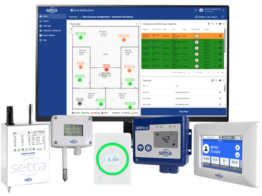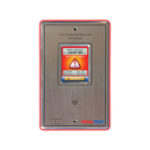
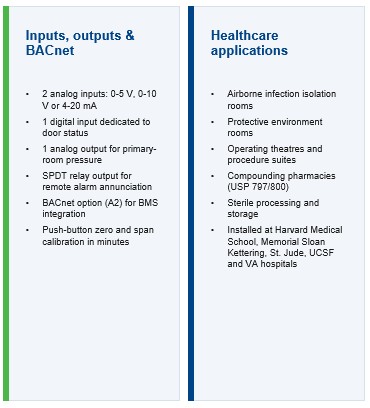
The Setra SRCM Room Condition Monitor is a touchscreen critical-room monitor designed for applications where accurate low differential-pressure measurement, alarming and BMS integration are required.
It is particularly suited to hospitals, laboratories, cleanrooms and other controlled environments where maintaining the correct positive or negative room pressure relationship is critical.
Unlike a basic room pressure indicator, the SRCM can monitor additional environmental parameters and can be configured to monitor up to two rooms from one device.
Typical Applications
The Setra SRCM is suitable for:
- Hospital isolation rooms
- Protective environments
- Operating theatres and suites
- Intensive care areas
- Emergency rooms
- Laboratories
- Biosafety laboratories
- Pharmaceutical facilities
- Cleanrooms
- Research facilities
- Vivariums
- Semiconductor and precision manufacturing areas
- Other positively or negatively pressurised critical rooms
Monitor Critical Room Pressure
The SRCM uses Setra’s high-accuracy capacitive differential-pressure sensing technology to monitor very low pressure differences between a controlled room and a reference space such as a corridor or adjoining room.
It can be configured for:
- Positive-pressure rooms
- Negative-pressure rooms
- Neutral-pressure monitoring
Maintaining the correct pressure relationship helps reduce the movement of airborne contamination between controlled and adjacent spaces.
Monitor Up to Two Rooms
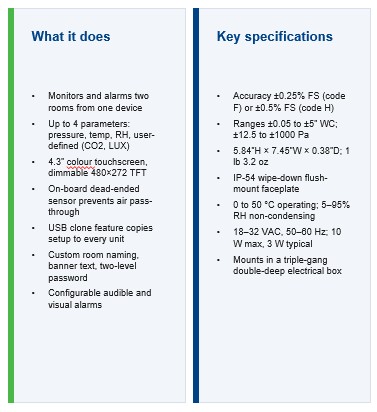
A single SRCM can be configured to monitor and alarm two rooms, helping reduce the number of monitoring devices required in suitable applications.
The display can be configured with individual room identification so facility staff can clearly identify which space is being monitored.
Monitor Additional Environmental Parameters
The SRCM can display up to four parameters per room.
These can include:
- Differential pressure
- Temperature
- Relative humidity
- CO₂
- Other user-defined analogue parameters
External sensors can therefore be incorporated into the room monitoring strategy where more than differential pressure needs to be displayed.
4.3-Inch Colour Touchscreen
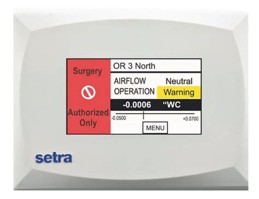
The SRCM incorporates a 4.3-inch colour touchscreen providing local indication of room conditions and access to configuration and alarm settings.
The colour-changing display provides a clear indication of room condition.
Typical status indication includes:
Green – room conditions within normal limits
Yellow – warning condition, such as an open door or pressure within the alarm deadband
Red – alarm condition after the configured alarm delay has expired
The display can also provide customised room names and condition descriptions.
Audible and Visual Alarms
The SRCM provides configurable visual and audible alarming for critical-room conditions.
Alarm features can be configured to suit the application and can include adjustable alarm delays to help prevent nuisance alarms caused by temporary events such as doors being opened.
A dedicated door-status input can also be incorporated into the monitoring strategy.
High-Accuracy Differential Pressure Measurement
The SRCM is specifically designed for very low differential-pressure applications.
Available configurations provide accuracy down to ±0.25% of full scale, depending on the selected model.
The Setra sensing technology is designed without the continuous airflow path associated with some flow-based differential-pressure sensors, helping avoid contamination transfer between the monitored room and reference space.
BACnet Integration
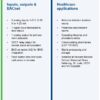
BACnet MS/TP communication is available with the appropriate SRCM configuration. Specify the BACnet option explicitly and confirm the ordered part number. Review the manufacturer’s BACnet objects list with the BMS contractor; do not assume BACnet/IP or Modbus support.
This allows the BMS to access room monitoring information such as:
- Differential pressure
- Room condition
- Alarm status
- Additional monitored parameters
The SRCM can therefore provide both local room indication and central monitoring through the BMS.
External Sensor Inputs
Two analogue inputs allow additional sensors to be connected using common signals including:
- 0–5 VDC
- 0–10 VDC
- 4–20 mA
These can be used for parameters such as:
- Temperature
- Relative humidity
- Additional pressure measurements
- CO₂
- Other environmental measurements
BMS Analogue Output
The SRCM also provides an analogue output representing the differential pressure of the primary room.
Depending on configuration, this can allow pressure information to be interfaced with other building-control equipment in addition to BACnet integration.
Door Status Monitoring
A dedicated digital input can be connected to a door switch or similar contact.
Door status can be incorporated into the configured alarm logic. Agree and test the response to a door left open as well as pressure loss with the door closed.
This can be particularly useful in hospital and laboratory applications where doors are frequently opened during normal operation.
Configurable Room Modes
The SRCM allows different operational modes to be selected.
For example, a room can be changed from its normal occupied operating mode into standby when pressure monitoring alarms are temporarily not required.
Password levels can be configured so routine operational changes can be made without providing access to the complete system configuration.
USB Configuration Cloning
For projects incorporating multiple SRCM monitors, configuration settings can be cloned between units.
This can significantly reduce commissioning time on larger hospital, laboratory or cleanroom projects where multiple rooms use similar configurations.
Flush-Mount Installation
The SRCM is designed for flush mounting into a standard deep electrical gang box, providing a clean installation suitable for critical environments.
The front design is suitable for wipe-down applications and is rated IP54 at the front surface.
Setra Lite, SRCM or FLEX?
Controls Direct can assist with selecting the appropriate Setra room monitoring platform.
Setra Lite
Best suited to simpler applications requiring:
- Local room pressure indication
- Visual indication; audible alarm is model-dependent
- Basic BMS pressure output
Setra SRCM
Best suited where the project requires:
- High-accuracy critical pressure monitoring
- Touchscreen interface
- Monitoring of up to two rooms
- Additional environmental parameters
- BACnet integration
- Advanced alarms
Setra FLEX
Best suited to more sophisticated applications requiring:
- Monitoring of up to three rooms
- Multiple parameters per room
- Larger touchscreen
- BACnet/IP or BACnet MS/TP integration
- Advanced room profiles
- Environmental monitoring; FLEX-RC adds control
Australian Project Support
Controls Direct can assist consultants, contractors, BMS integrators and facility managers with SRCM selection and application design.
For project assistance, provide:
- Room schedule
- Mechanical drawings
- Required positive or negative pressure
- Differential-pressure setpoints
- Temperature and humidity requirements
- BMS specification
- BACnet requirements
- Additional sensor requirements
- Door monitoring requirements
- Quantities
We can then assist with selecting the appropriate SRCM configuration and associated sensors.
Need Help Selecting a Setra SRCM?
Send Controls Direct your room schedule, specification or mechanical drawings and we can assist with selecting the appropriate critical-room monitoring solution.
Specification checks for BMS contractors
The SRCM’s two analogue inputs support 0–5 VDC, 0–10 VDC or 4–20 mA signals; Setra specifies an installer-supplied 250 Ω resistor for the current input arrangement. The analogue output represents primary-room pressure only. Allocate additional pressure, temperature and humidity signals before selecting the unit: four displayed parameters per room do not mean four dedicated physical sensor inputs per room.
Confirm the selected pressure range and accuracy option, power requirements, wall-box dimensions and access for calibration. At commissioning, verify sensor polarity, units in Pa, input scaling, door response, alarm delays and the full signal path to the BMS. Agree who owns alarm acknowledgement, trending and loss-of-communication reporting.
Frequently asked questions
How many rooms can SRCM monitor?
Up to two rooms, with suitable measurement sources and configuration. Allow for an external pressure sensor where needed; one on-board pressure sensor does not measure every room relationship independently.
Does SRCM measure temperature, humidity and CO₂ internally?
These readings require appropriate external sensor signals or supported network values. Confirm the input source for each displayed parameter.
Is SRCM suitable for Australian isolation rooms and pharmacies?
It can form part of a monitoring system when its configuration meets the project brief. Confirm local and remote alarms, reference spaces, door logic and records with the responsible design team. Monitor selection alone does not establish facility compliance.
What information is needed to specify SRCM?
Provide the room schedule, pressure ranges, required sensor signals, BMS protocol, alarm requirements and installation details. Controls Direct can help confirm the appropriate configuration and accessories.
Setra room monitor information
Explore Setra Lite for local pressure indication, Setra SRCM for two-room condition monitoring and Setra FLEX for multi-parameter monitoring and optional control. Read our Critical Room Monitoring in Australia guide for application, alarm and commissioning considerations.
Manufacturer documentation
Setra SRCM product information, BACnet objects and downloads · SRCM data sheet · SRCM operating instructions. Technical content checked 29 September 2026. Confirm current documentation and the supplied configuration before procurement.